
Proxy Manager
GMSSH Proxy Manager is a visual network proxy management tool for Linux servers. It covers NIC IP Management and Proxy Service Management, supporting multi-IP binding, virtual NIC creation, and proxy service configuration.
Core Features
| Module | Purpose | Core Capabilities |
|---|---|---|
| NIC IP Management | Network Interface Mgmt | View physical NICs, add/delete IPs, create virtual NICs |
| Proxy Service Mgmt | Proxy Configuration | Create single/batch proxy services, multi-filter management |
NIC IP Management
Centralized Network Interface & IP Management. Displays network interface info and IP allocation by NIC, with flexible IP addition and management.
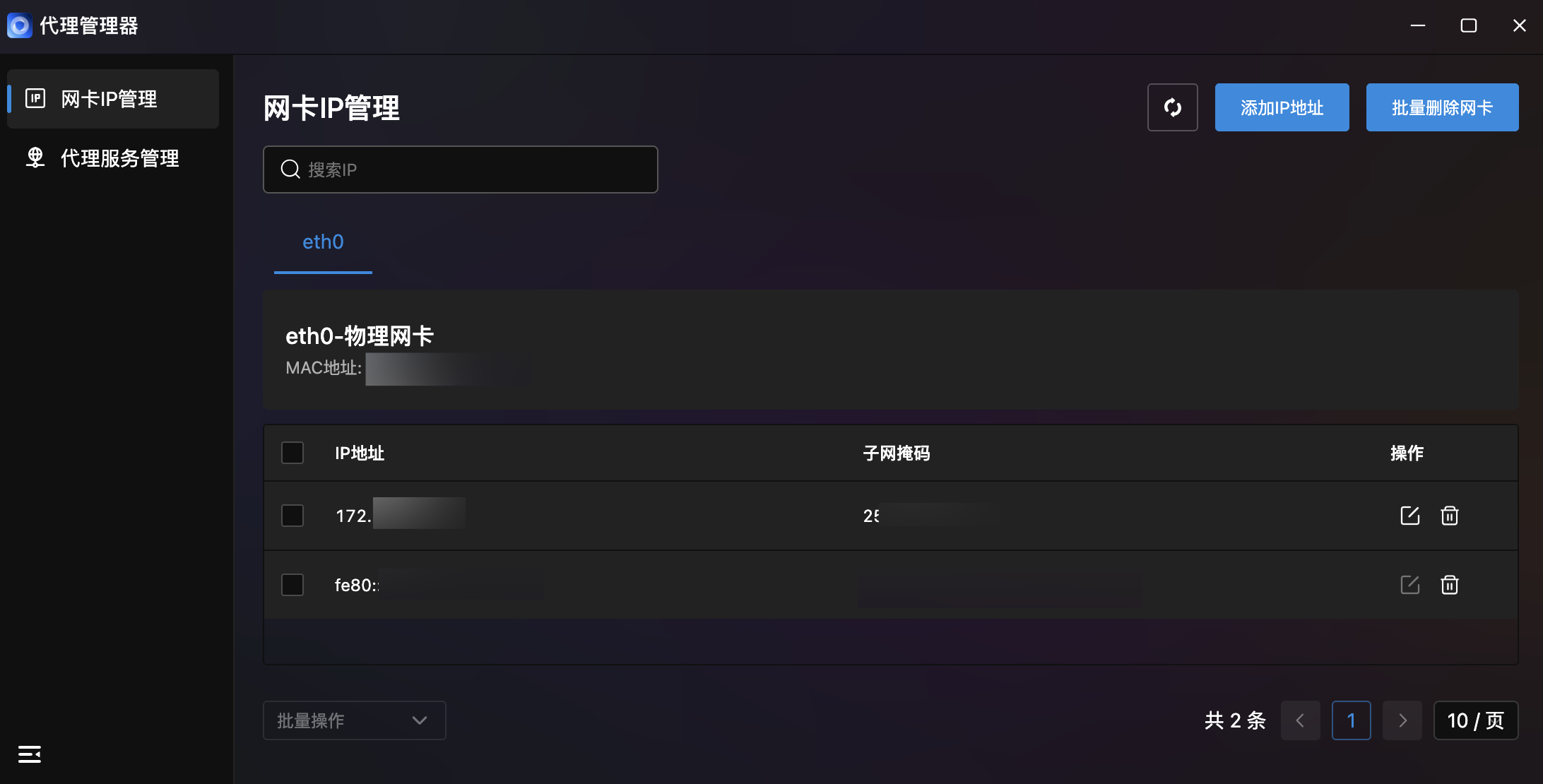
- NIC List: Tab-based display of all server NICs; click to switch.
- NIC Info: Each NIC card shows type (e.g., "Physical NIC") and MAC address.
- IP Address Table: Table showing all IPs under each NIC with IP address, subnet mask, and actions (edit/delete). Supports IPv4 and IPv6.
- Search: Top IP search box for quick lookup.
- Batch Operations: Bottom dropdown for batch IP management. Top-right "Batch Delete NIC" button.
- Pagination: Bottom pagination with total count and page size configuration.
Add IP Address
Click "Add IP Address" in the top-right for two modes:
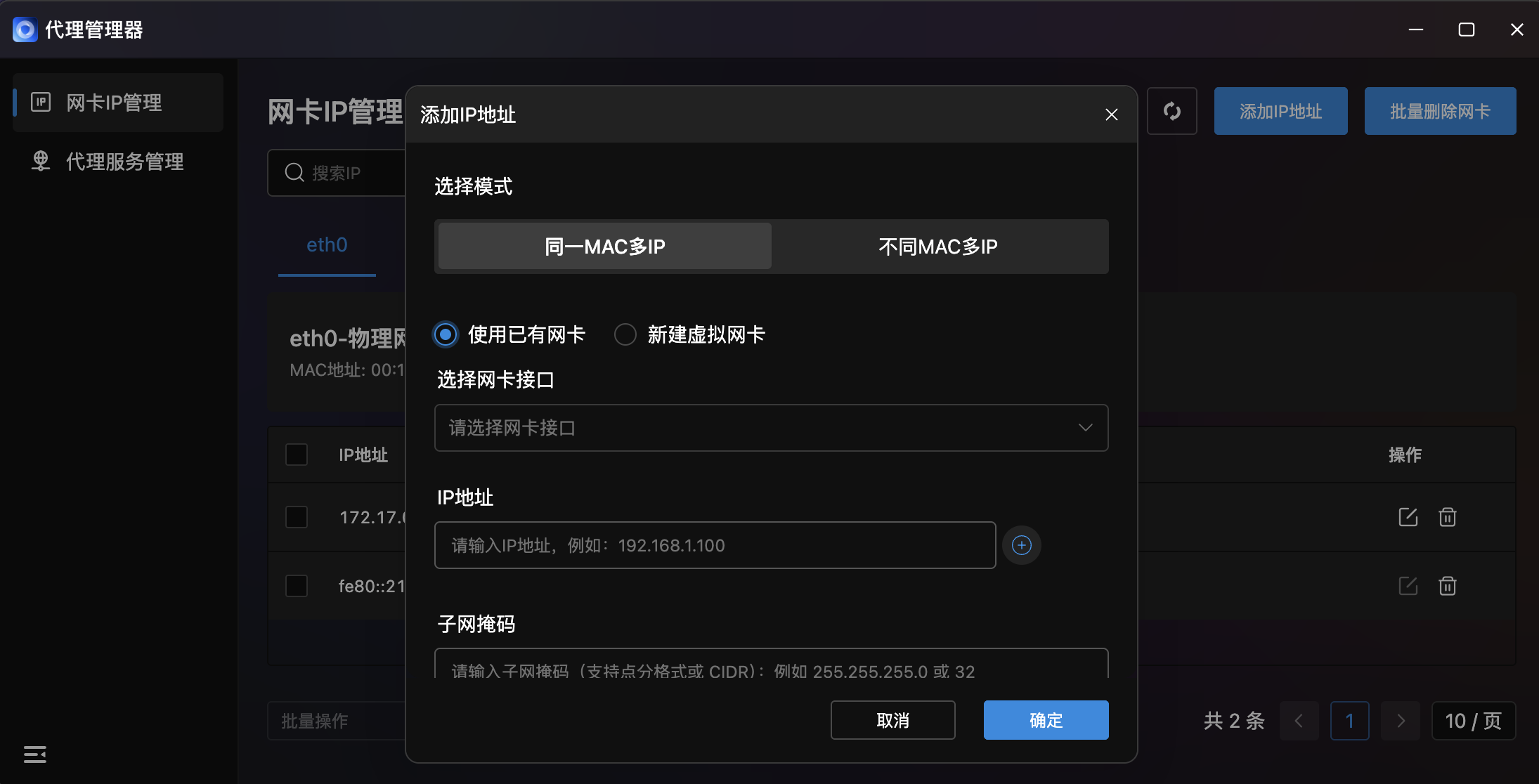
Same MAC Multiple IPs
Bind multiple IPs to the same physical NIC (same MAC), two methods:
Use Existing NIC:
- Select NIC: Dropdown to choose target NIC.
- IP Address: Enter target IP (e.g.,
192.168.1.100) with auto-detection. - Subnet Mask: Dot notation (
255.255.255.0) or CIDR (32).
Create Virtual NIC:
- Select Parent NIC: Dropdown for parent NIC.
- Virtual NIC Name: Custom name (max 15 characters).
- MAC Address: Enter MAC (e.g.,
02:1A:2B:3C:4D:60); leave empty for random generation.
Different MAC Multiple IPs
Create independent virtual NICs (different MACs) for each IP. Two input methods — Form and CSV:
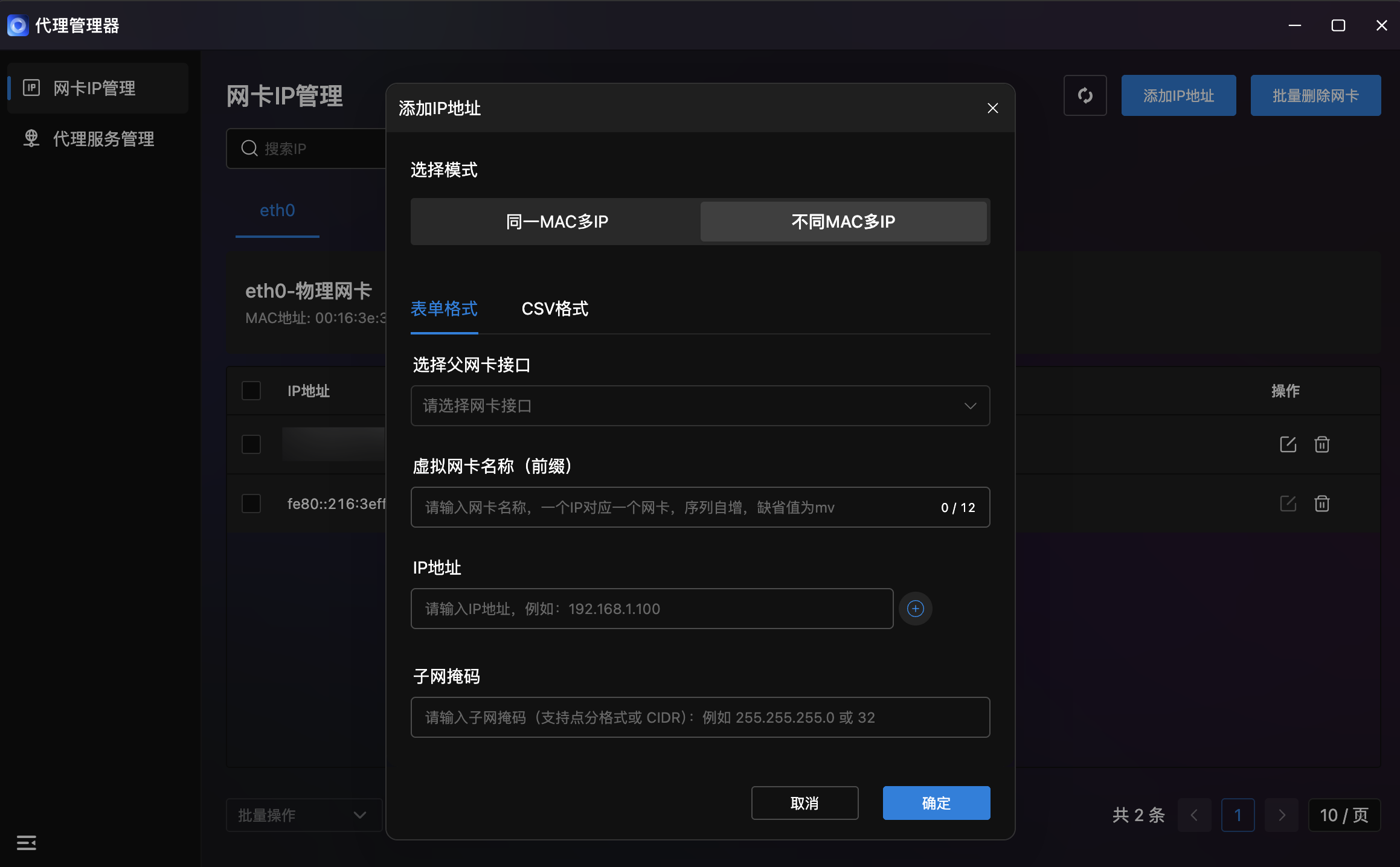
Form Format:
- Select Parent NIC: Dropdown for parent NIC.
- Virtual NIC Name (Prefix): Name prefix (max 12 chars, default
mv), auto-incrementing sequence. - IP Address: Target IP address.
CSV Format:
- Select Parent NIC: Dropdown for parent NIC.
- IP List: Bulk input in code editor, one per line:
IP_Address Subnet_Mask(CIDR) Virtual_NIC_Name MAC_Address
- Example:
192.168.0.1 24 virtual_nic_name MAC_address
Proxy Service Management
Proxy Service Configuration & Operations Center. Table-based management of all proxy services.
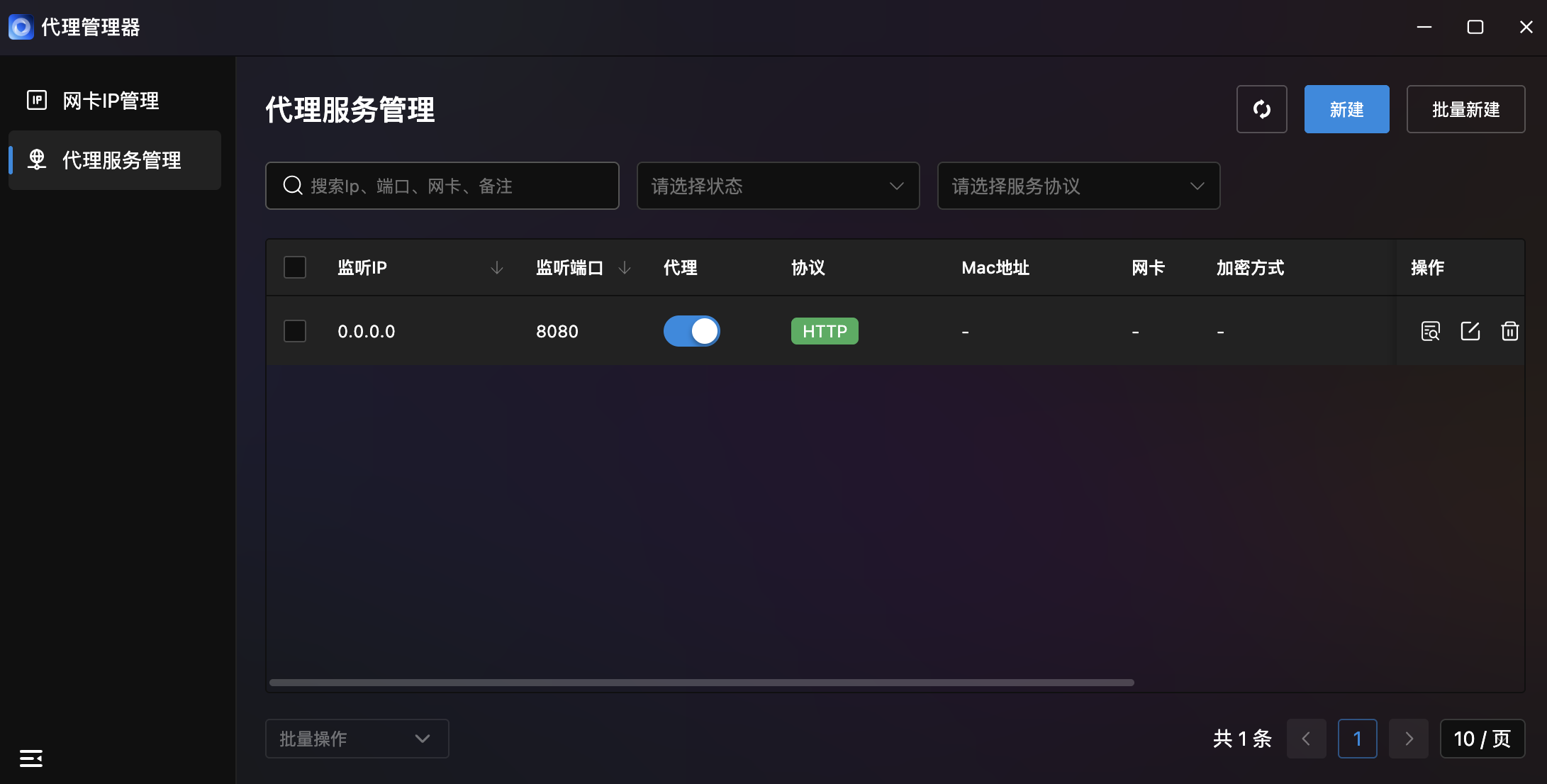
- Service List:
| Column | Description |
|---|---|
| Listen IP | Proxy service bind IP |
| Listen Port | Proxy service listen port |
| Proxy | Proxy target info |
| Protocol | Service protocol type |
| MAC Address | Bound NIC MAC address |
| NIC | Bound NIC name |
| Encryption | Encryption method |
| Actions | Edit/Delete operations |
- Multi-Filter: Triple filtering:
- Search: By IP, port, NIC, or notes.
- Status Filter: Dropdown by service status.
- Protocol Filter: Dropdown by protocol.
- Create Service: Top-right "Create" button for single service creation.
- Batch Create: Top-right "Batch Create" button for bulk service deployment.
Create Proxy Service
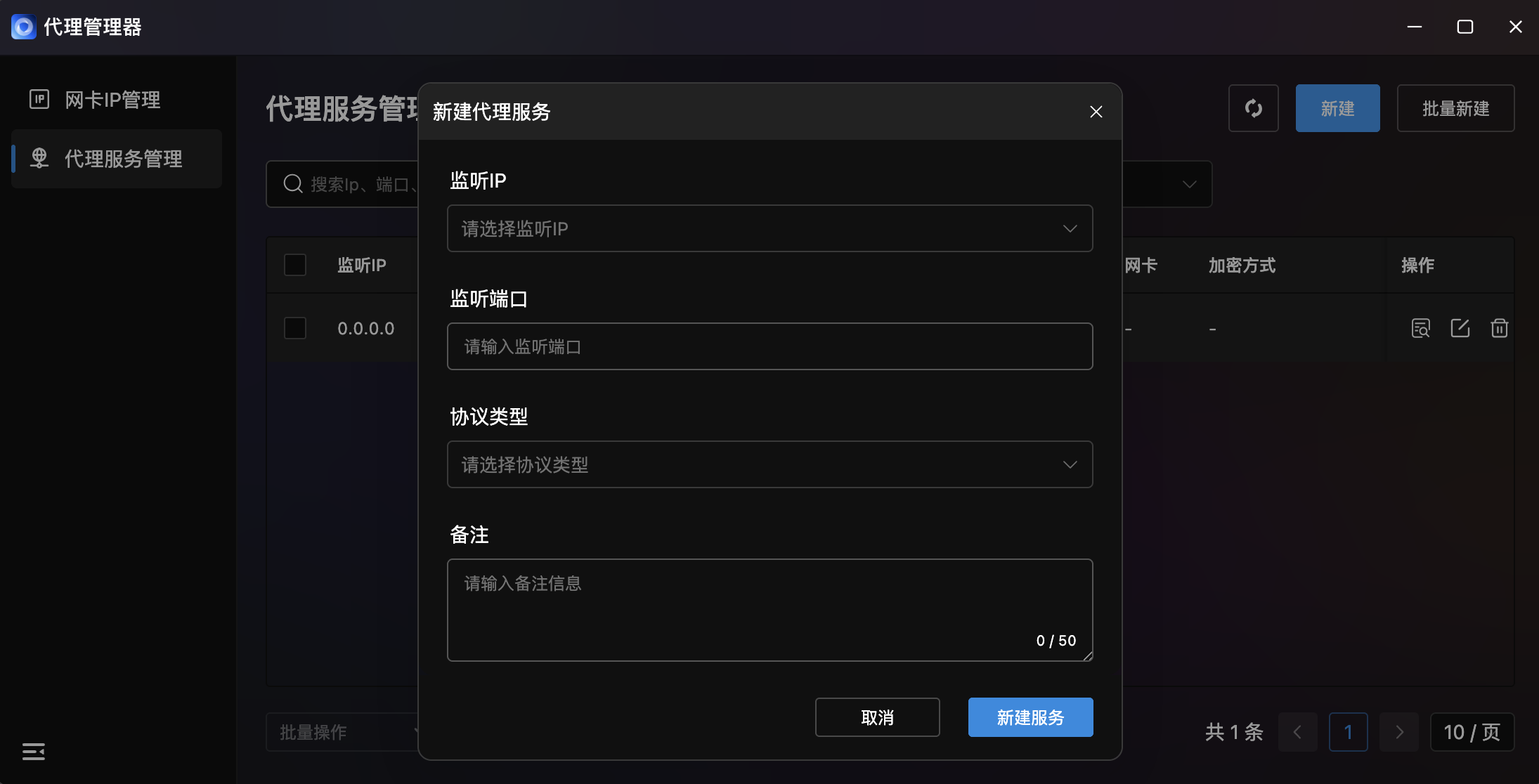
| Field | Description |
|---|---|
| Listen IP | Dropdown to select listen IP |
| Listen Port | Proxy service listen port |
| Protocol Type | Dropdown for protocol selection |
| Notes | Notes (max 50 characters) |
Click "Create Service" to confirm or "Cancel" to abort.