
WAF Firewall
GMSSH WAF Firewall is a Web Application Firewall management tool for Linux servers. It covers Dashboard, Protection Events, Website Protection, Blacklist/Whitelist, Global Configuration, Protection Rules, Attack Alerts, and Settings — providing comprehensive application-layer security for your web services.
Core Features
| Module | Purpose | Core Capabilities |
|---|---|---|
| Dashboard | Security Overview | Real-time monitoring, interception stats, attack trends |
| Protection Events | Event Records | Historical event viewing and analysis |
| Website Protection | Site-Level Protection | Per-site protection policy configuration |
| Blacklist/Whitelist | Access Control | IP/URL/UA blacklist and whitelist management |
| Global Configuration | Global Parameters | WAF global protection parameter settings |
| Protection Rules | Rule Management | Protection rule creation and management |
| Attack Alerts | Alert Notifications | Attack alert policies and notification configuration |
| Settings | System Settings | WAF system-level settings |
Initialization
On first launch, the system detects WAF environment status. If not initialized, automatic initialization begins.
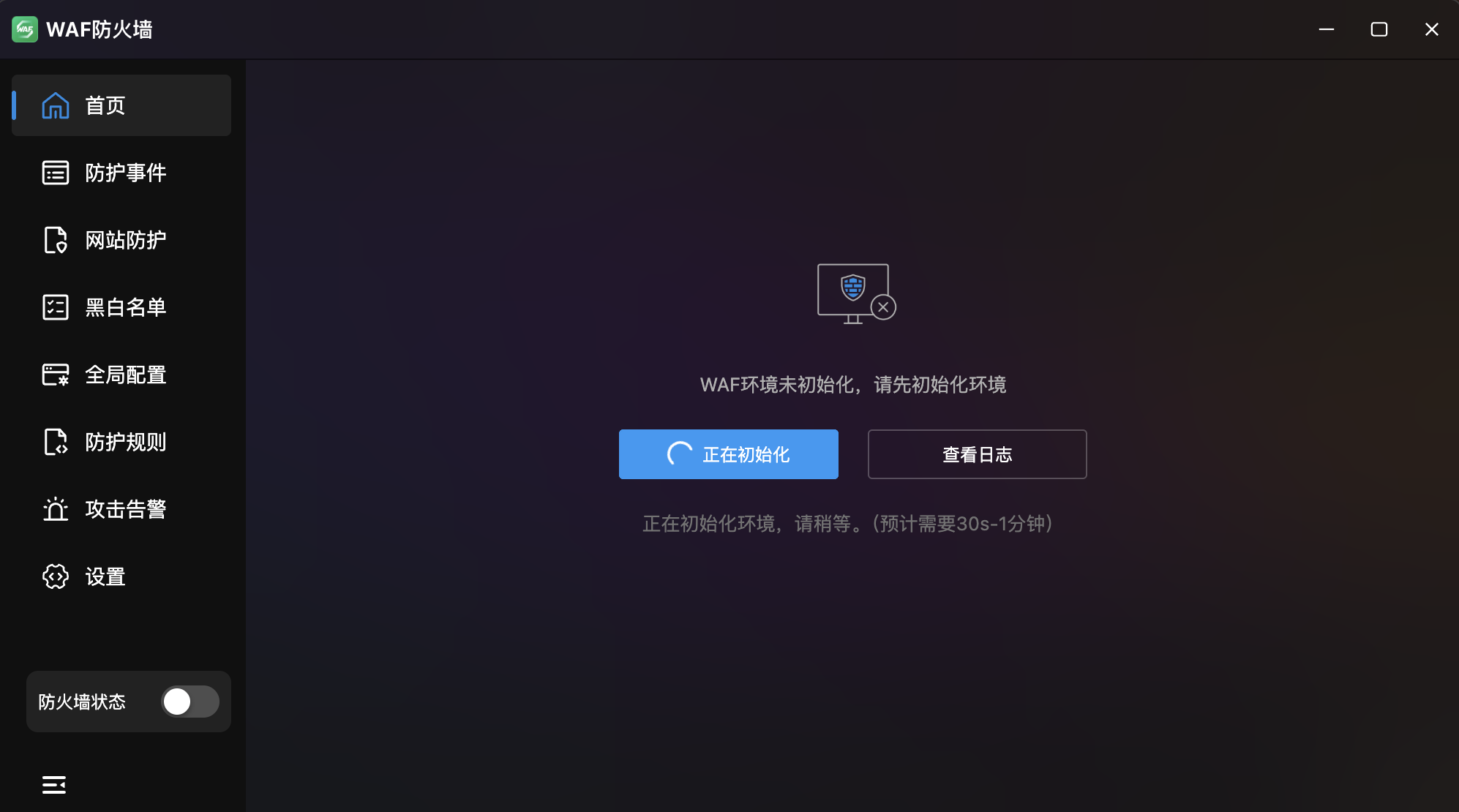
- Auto Detection: Prompts "WAF environment not initialized, please initialize first".
- Estimated Time: 30 seconds to 1 minute.
- View Logs: Monitor initialization progress.
- Firewall Toggle: Bottom-left switch available after initialization.
Dashboard
Real-Time WAF Security Dashboard. Displays real-time protection status and attack trends with per-site filtering.
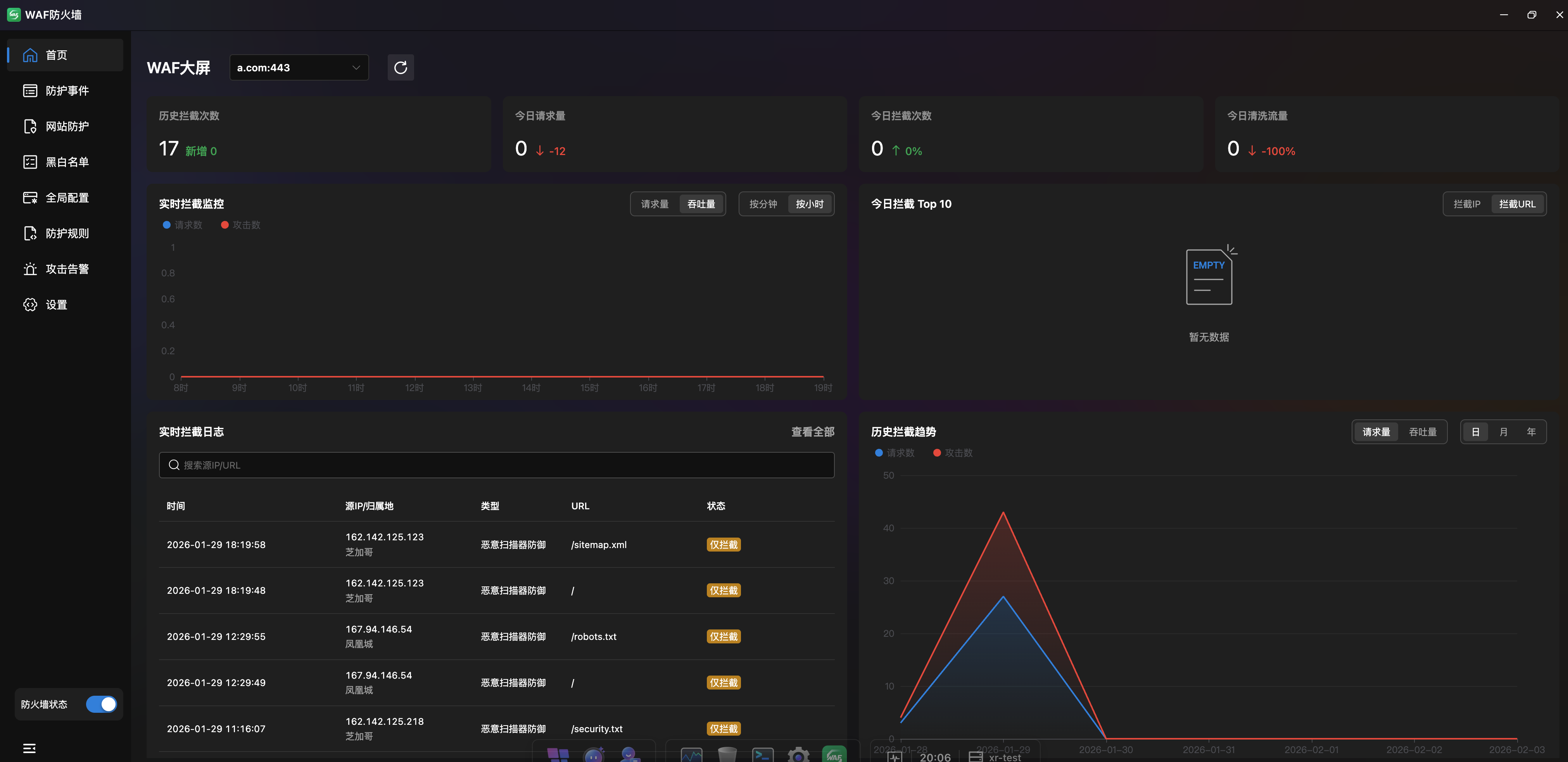
Key Metrics
Four top cards showing critical security indicators:
| Metric | Description |
|---|---|
| Historical Interceptions | Total attack interceptions with new count badge |
| Today's Requests | Total requests today with percentage change |
| Today's Interceptions | Today's blocked attacks with trend |
| Today's Cleaned Traffic | Malicious traffic cleaned today with trend |
Real-Time Interception Monitor
Line chart showing request and attack trends:
- Data View: "Request Volume" and "Throughput" toggle.
- Time Granularity: "Per Minute" and "Per Hour".
Today's Top 10 Interceptions
Horizontal bar chart ranking attacks by type/IP/URL:
- View Toggle: "Blocked IPs" and "Blocked URLs" dimensions.
- Attack Categories: Color-coded by type (XSS, SQL Injection, CC Attack, DDoS, etc.).
Real-Time Interception Log
| Column | Description |
|---|---|
| Time | Interception timestamp |
| Source IP / Location | Attack source IP and geographic location |
| Trigger Type | Attack type (e.g., XSS Attack) |
| Request URL | Target URL |
| Status | Action taken (Temporary Block / Intercept Only) |
- Search: By source IP or URL.
- View All: Click "View All >" to jump to full event list.
Historical Interception Trends
Line chart showing attack history:
- Data View: "Request Volume" and "Throughput" toggle.
- Time Range: "Day", "Month", "Year".
- Dual Line Comparison: Shows both requests and attacks for ratio analysis.
Protection Events
Complete Protection Event Records. Table view of all intercepted or blocked attack requests with multi-dimensional search.
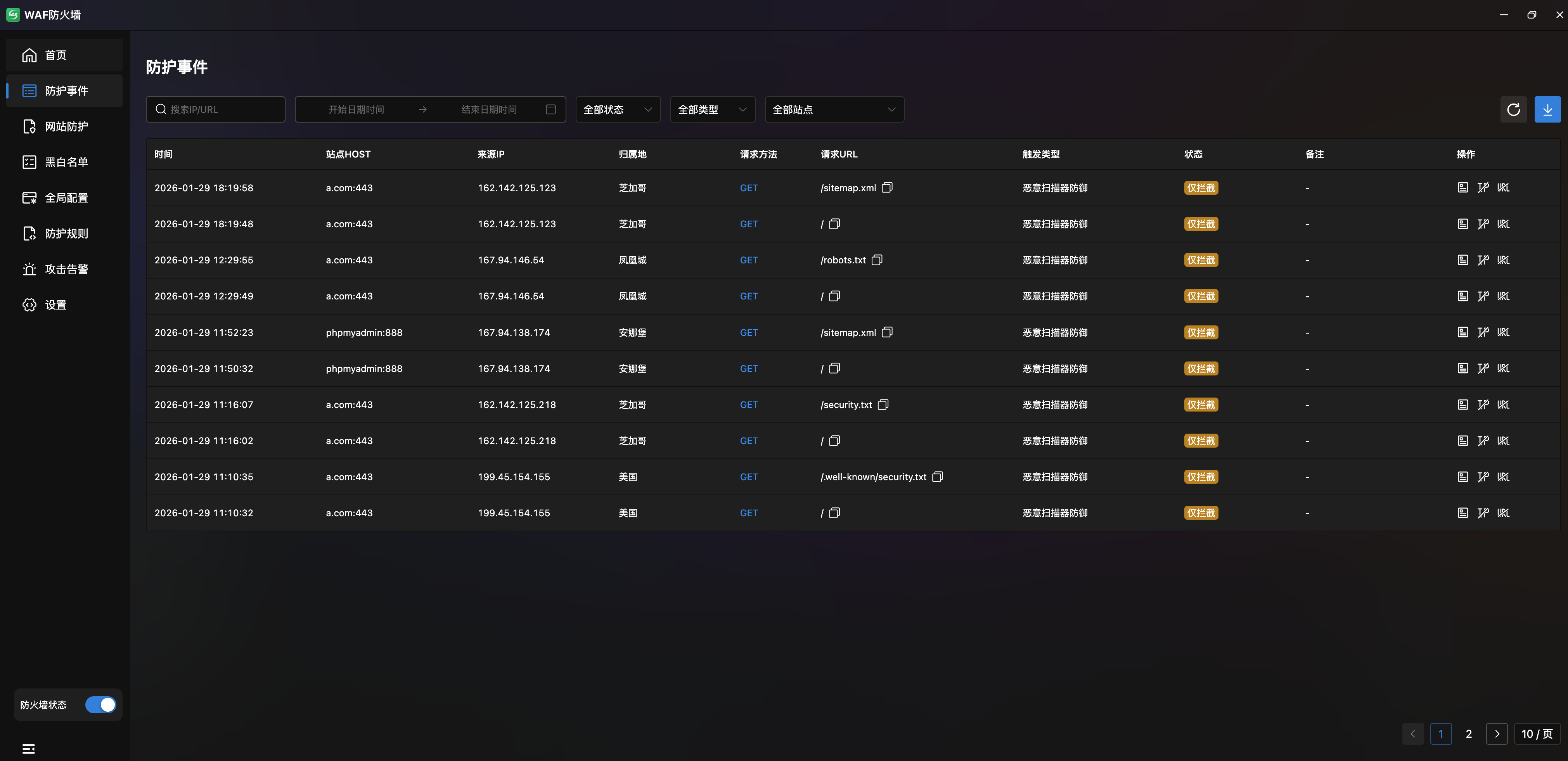
- Event List:
| Column | Description |
|---|---|
| Time | Event timestamp |
| Site HOST | Attacked site domain |
| Source IP | Attacker IP address |
| Location | IP geographic location |
| Method | HTTP method (GET/PUT/POST etc.) |
| Request URL | Target URL (hover for full URL) |
| Trigger Type | Attack type (XSS, CC, etc.) |
| Status | Action taken (Temporary Block / Intercept Only) |
| Notes | Block method description |
- Filters: Search by IP/URL/UA, time range, and status.
- Export: Top-right download button.
Event Details
Click an event for full attack details:
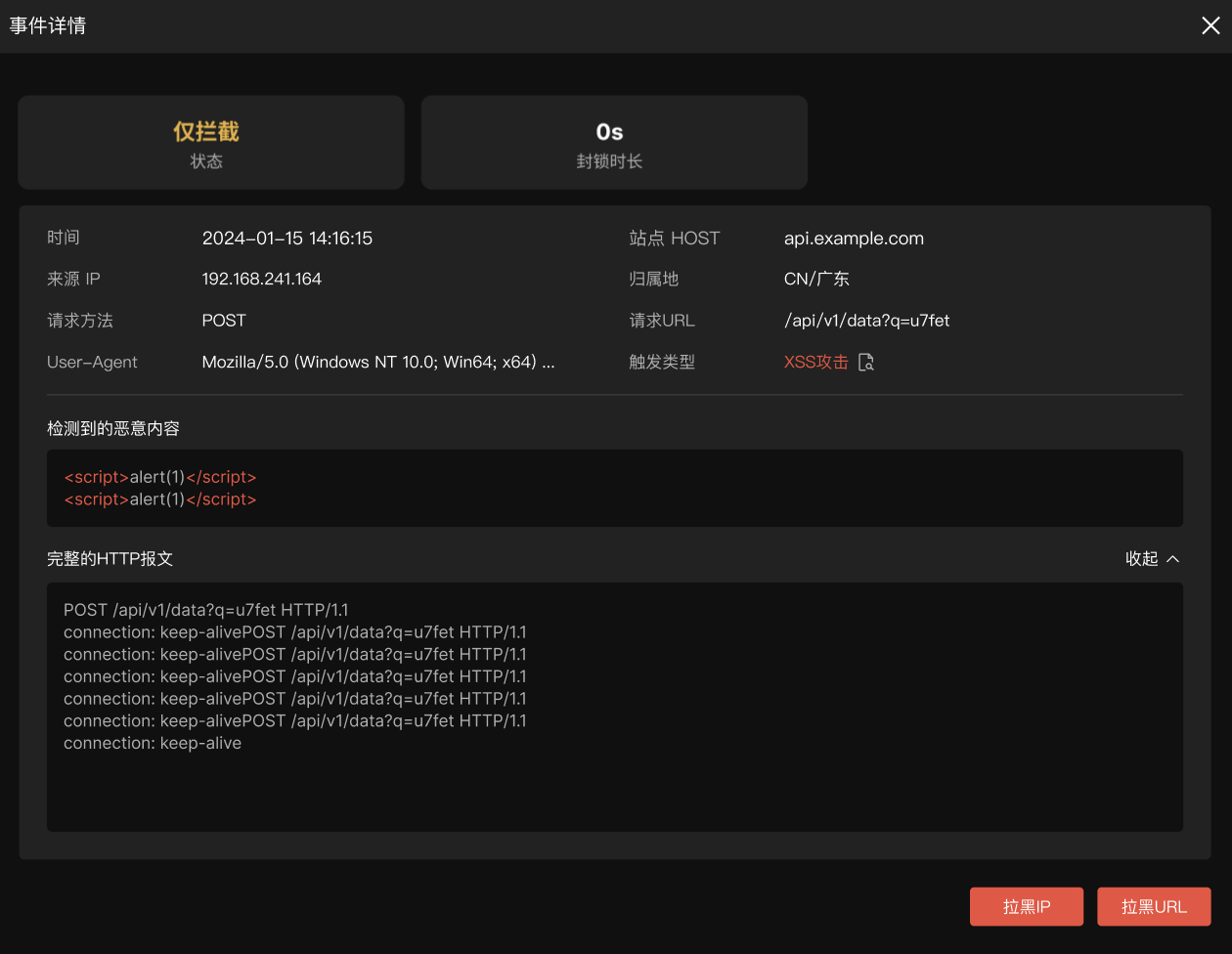
- Status Card: Action taken and block duration.
- Request Info: Time, site HOST, source IP, location, method, URL, User-Agent, trigger type.
- Detected Malicious Content: Syntax-highlighted malicious payload (e.g.,
<script>alert(1)</script>). - Full HTTP Request: Expandable/collapsible complete HTTP request including headers.
- Quick Actions: "Block IP" and "Block URL" buttons to add to blacklist.
Website Protection
Site-Level Protection Policy Management. Independent protection policies per site for fine-grained security.
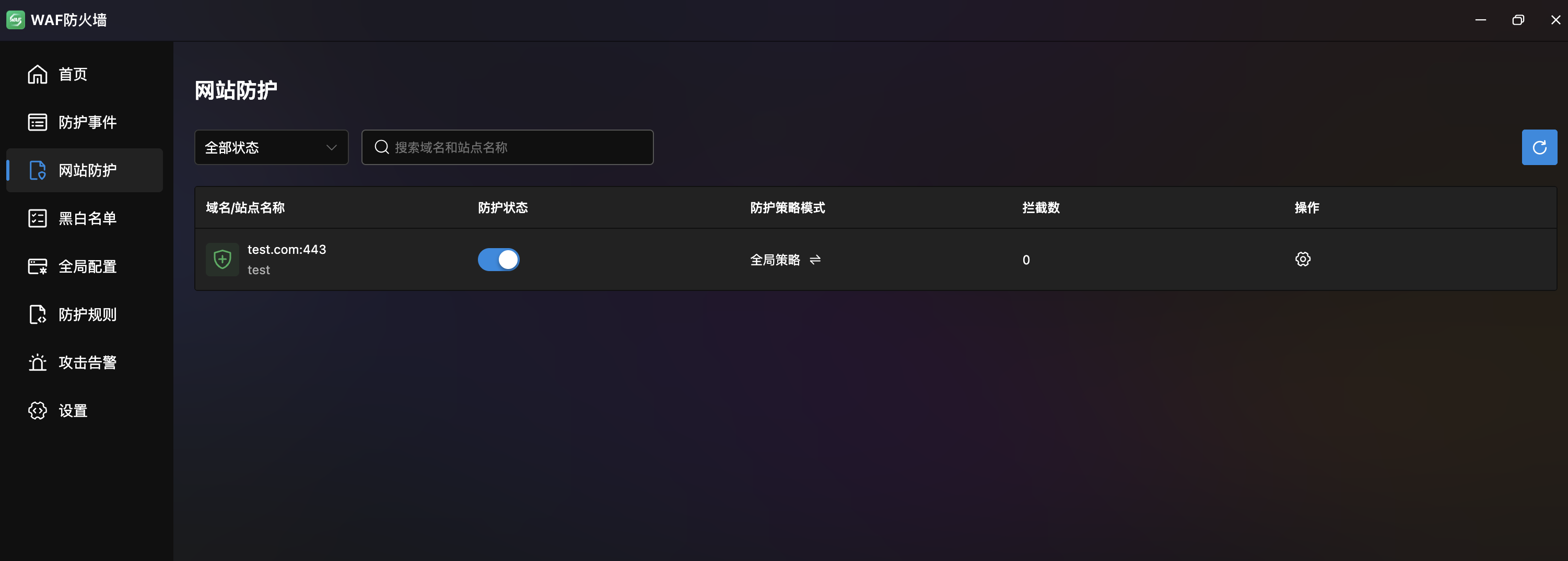
- Site List: Table showing domain/site name, protection status (toggle), policy mode, interception count, and actions.
- Filter: By status and domain/site name search.
- Protection Toggle: Independent per-site switch.
Site-Level Policy Configuration
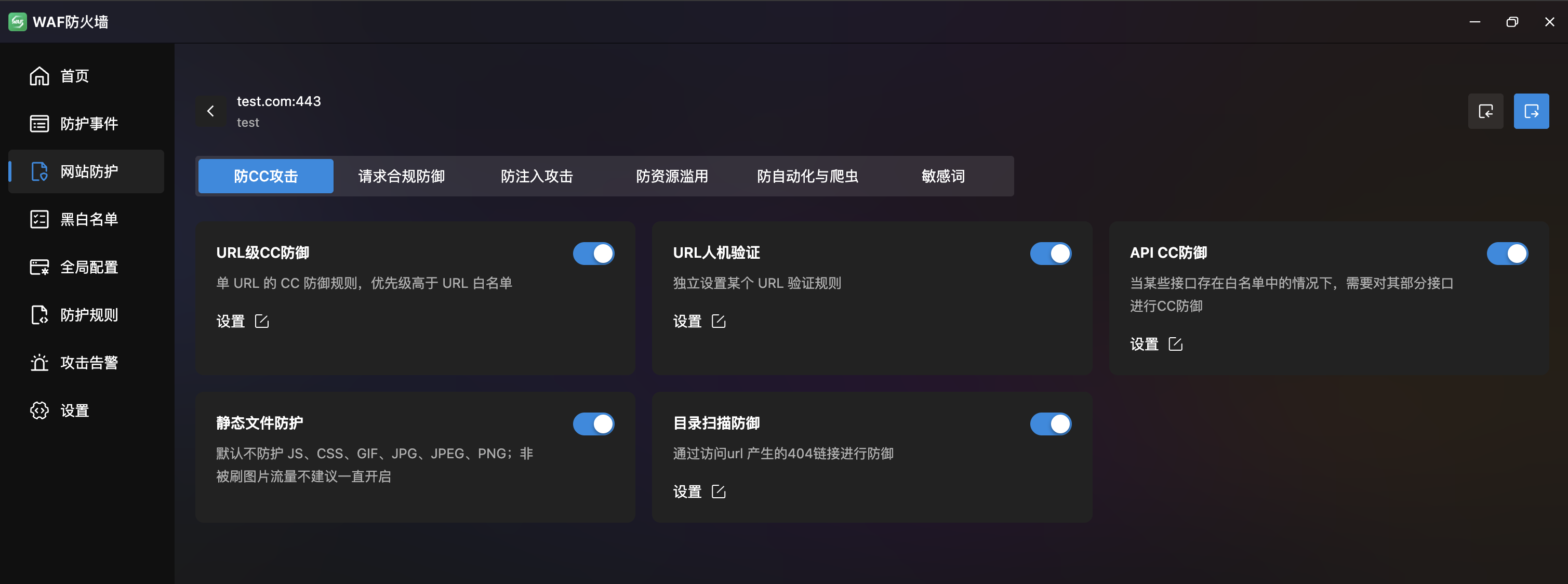
Six independent configuration tabs per site:
- Anti-CC Attack: URL-level CC defense, URL CAPTCHA, API CC defense, static file protection, directory scan defense.
- Request Compliance: Bot protection, HTTP request filtering, domestic/international access restrictions.
- Anti-Injection: SQL injection, command execution, XSS, and Cookie defense toggles.
- Anti-Resource Abuse: Malicious download, URL protection, and file upload security.
- Anti-Automation & Crawlers: Crawler and scanner defense.
- Sensitive Words: Response desensitization and request keyword interception.
Tip
Site-level configuration takes priority over global configuration, allowing differentiated protection based on business needs.
Blacklist/Whitelist
Multi-Dimensional Access Control. Three tabs: "Whitelist", "Blacklist", and "Spider Pool", supporting IP, UA, and URL rule types.
Whitelist
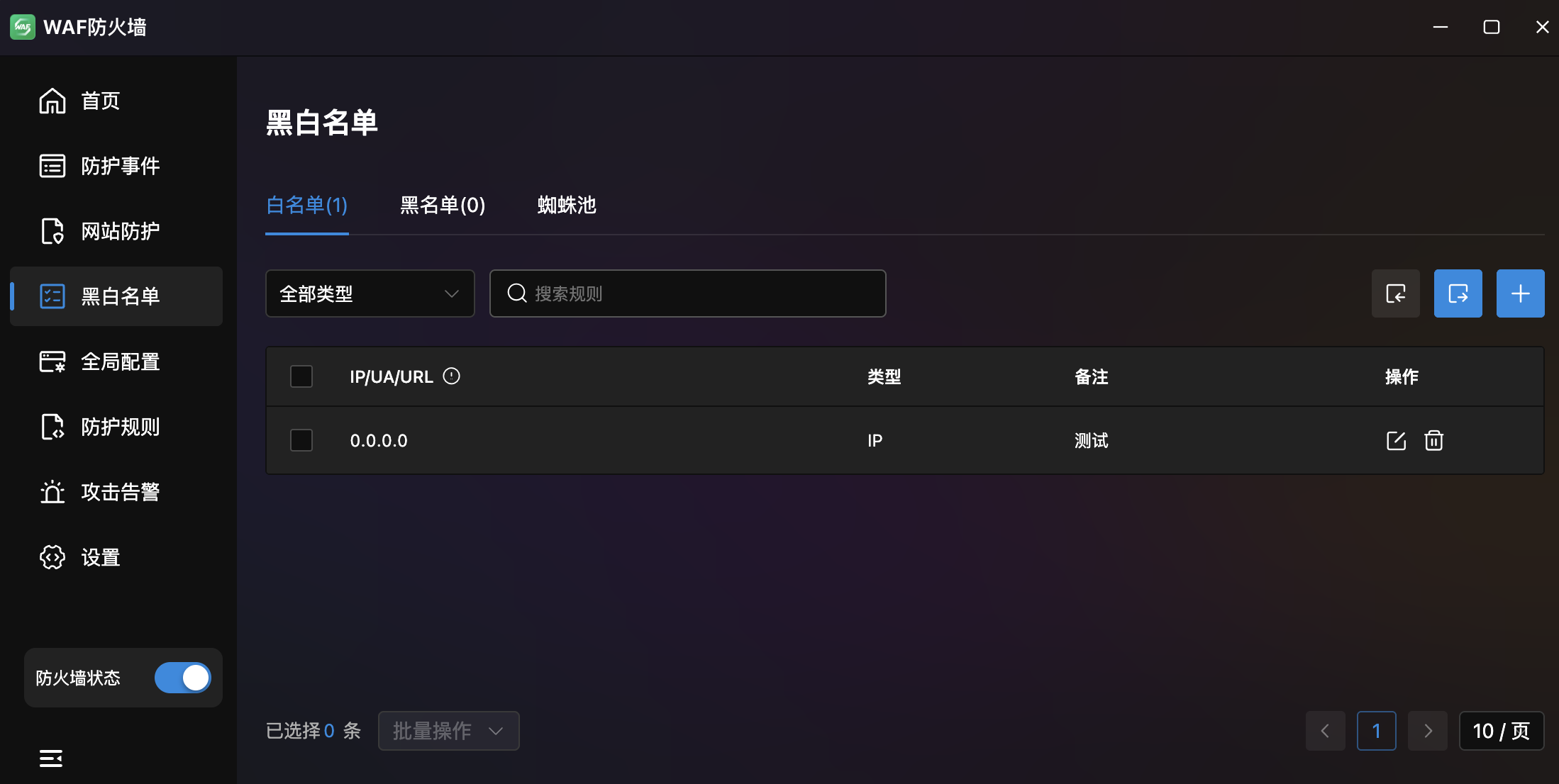
- Rule List: Table with IP/UA/URL, type, notes, and actions. Supports drag-reorder.
- Type Filter: Dropdown (All / IP / UA / URL) with search.
- Actions: Import, export, and add buttons; edit and delete per rule.
- Whitelisted requests bypass all protection rules.
Blacklist
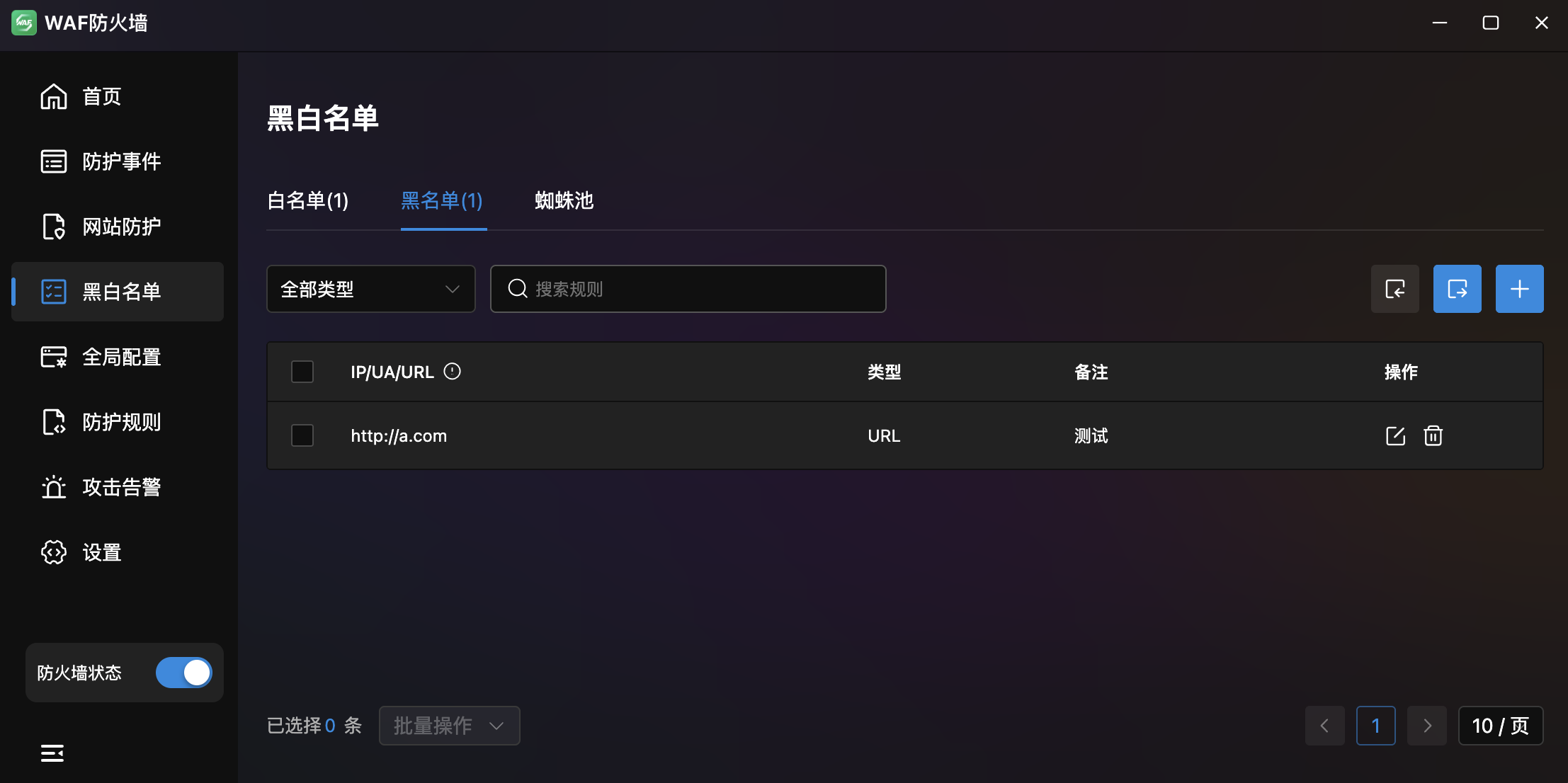
- Same structure as whitelist: Supports IP, UA, URL types.
- Blacklisted requests are immediately blocked from all site resources.
Spider Pool
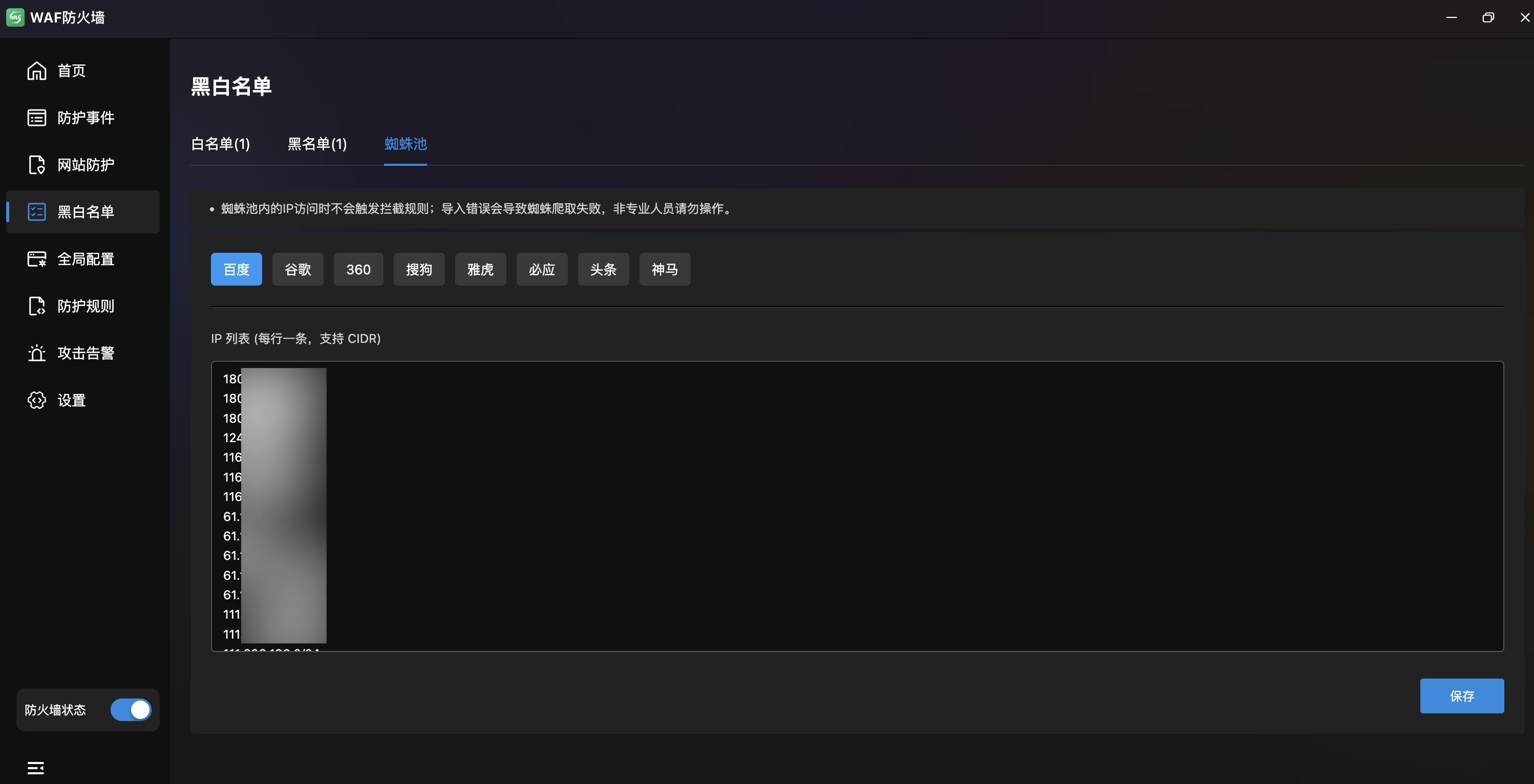
- Search Engine Spider Whitelist: Pre-configured IP ranges for major search engine crawlers to protect SEO.
- Engine Tabs:
Baidu·Google·360·Sogou·Yahoo·Bing·Toutiao·Shenma. - IP List Editor: Text area per engine with one IP or CIDR per line (e.g.,
180.76.15.0/24). - Note: Spider pool IPs bypass interception rules. Incorrect entries may cause crawl failures.
Global Configuration
WAF Global Protection Policies. Six tabs covering CC defense, compliance, injection, resource abuse, automation, and sensitive words.
Anti-CC Attack
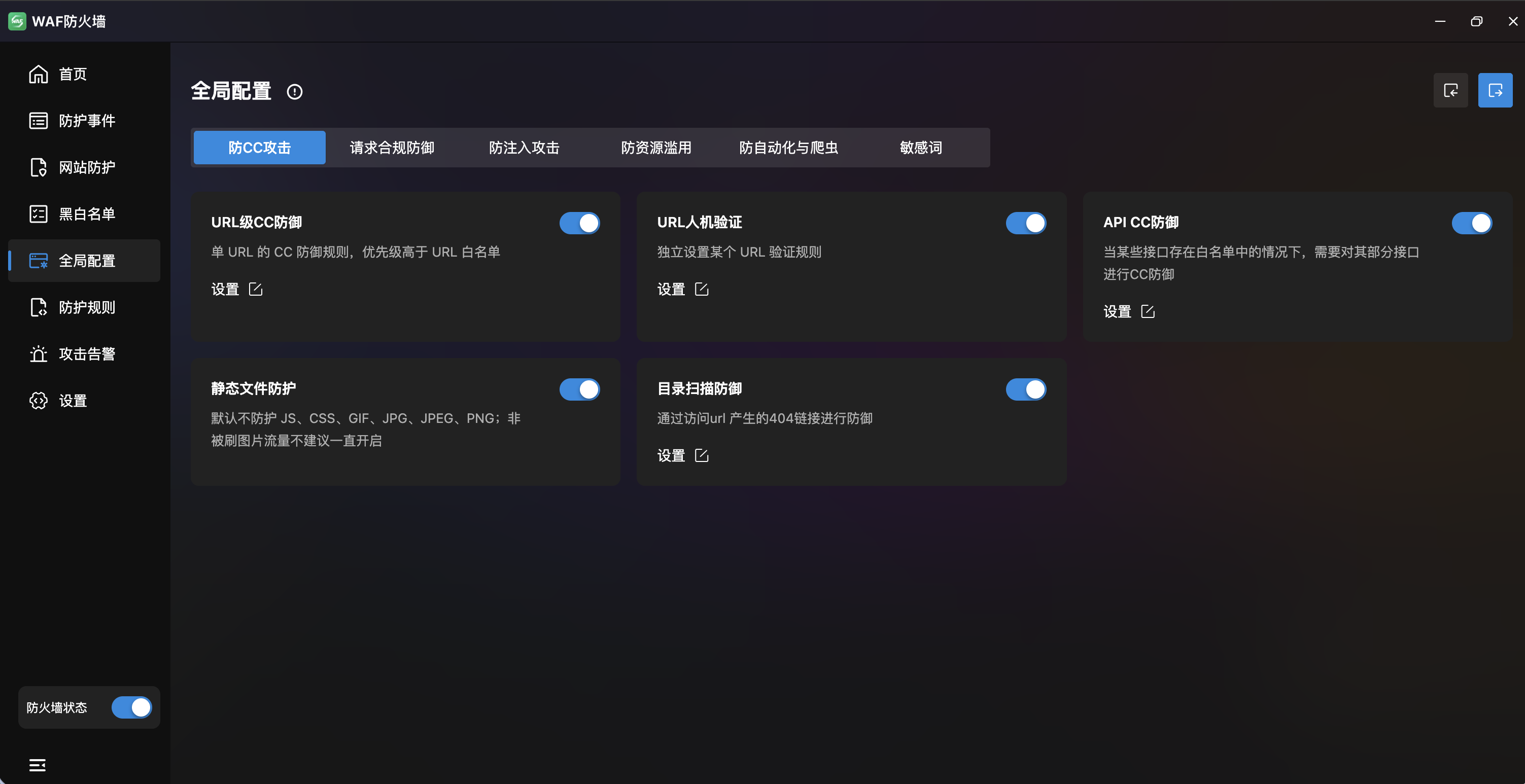
Five CC protection strategies:
| Feature | Description |
|---|---|
| URL-Level CC Defense | Per-URL CC rules with match mode, URL, time/count, verification level, block time/type, response page |
| URL CAPTCHA | Independent CAPTCHA rules for specific URLs with exact and regex matching |
| API CC Defense | CC protection for whitelisted API endpoints |
| Static File Protection | Excludes JS, CSS, GIF, JPG, PNG by default; not recommended for continuous use |
| Directory Scan Defense | Defends based on 404 link generation with configurable time/count thresholds |
Request Compliance
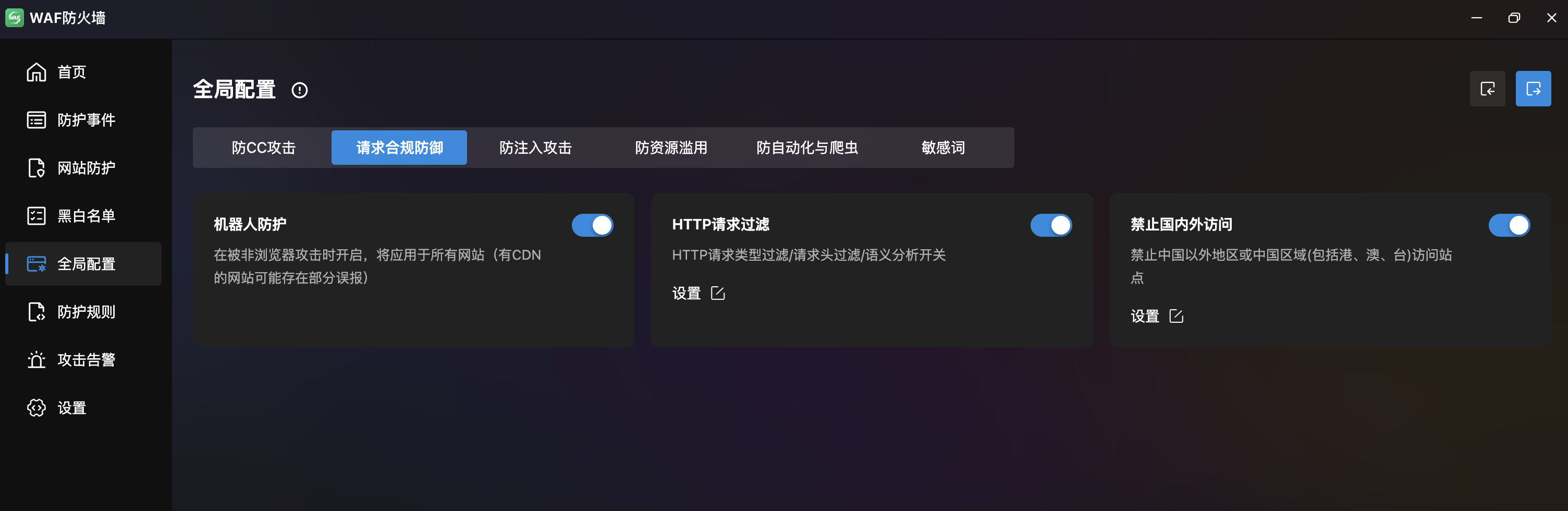
| Feature | Description |
|---|---|
| Bot Protection | Enable when under non-browser attacks; applies to all sites (CDN sites may have false positives) |
| HTTP Request Filtering | Three sub-tabs: request type (HTTP method restrictions), header filtering (max lengths), request quantity (parameter limits, base64 decoding toggle) |
| Geographic Access Restriction | Block domestic/international access with configurable IP lists (CIDR format) |
Anti-Injection
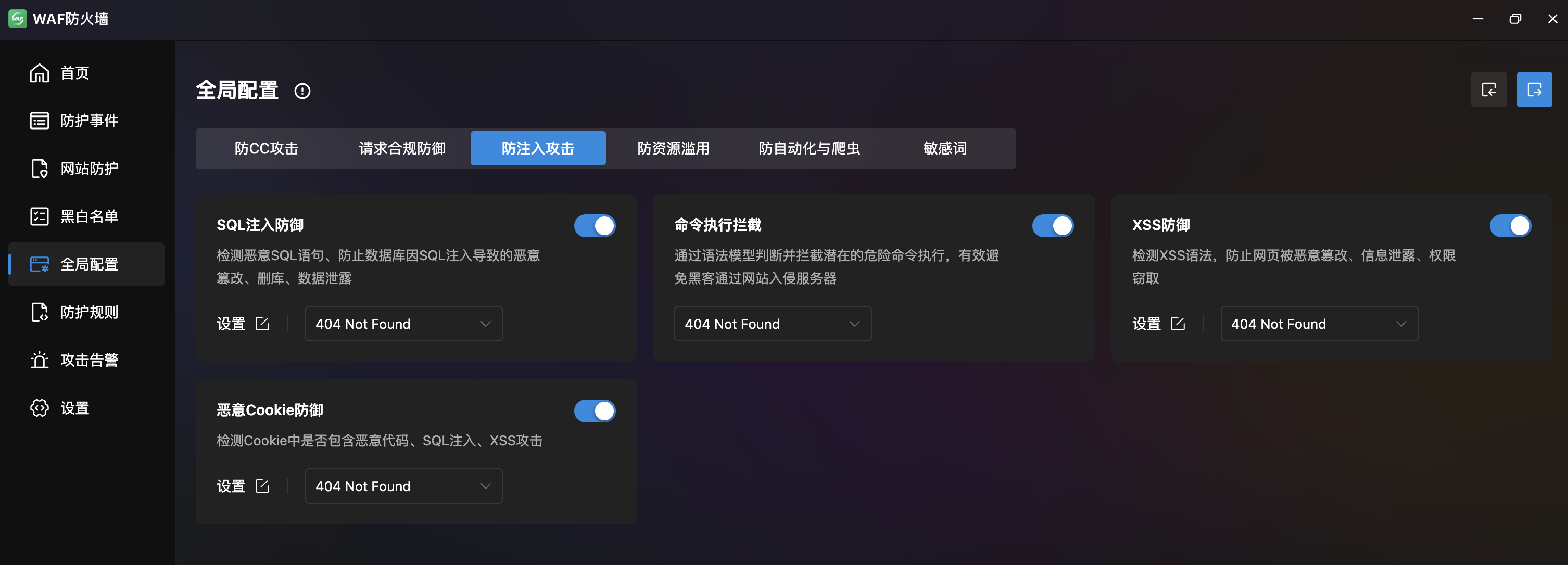
| Feature | Description |
|---|---|
| SQL Injection Defense | Detects malicious SQL to prevent database tampering, deletion, and data leaks. Built-in rules for file inclusion, SSRF, Java RCE, SQL injection, XSS |
| Command Execution Block | Syntax model detection to prevent server compromise via websites |
| XSS Defense | Detects XSS syntax with rules for directory protection, PHP protocol filtering, base64 decoding, system function blocking |
| Malicious Cookie Defense | Detects malicious code, SQL injection, and XSS in cookies |
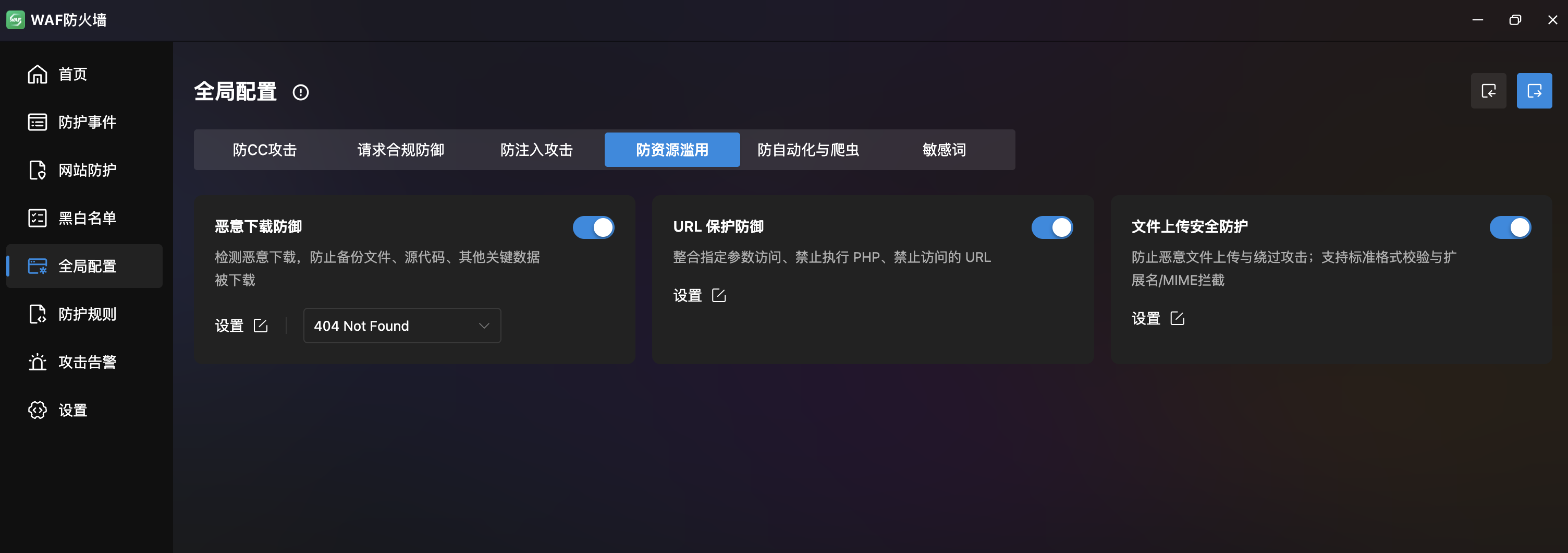
Anti-Resource Abuse
| Feature | Description |
|---|---|
| Malicious Download Defense | Prevents download of backup files, source code, and critical data |
| URL Protection | Combined parameter access, PHP execution blocking, and URL access blocking |
| File Upload Security | Prevents malicious uploads with format validation and extension/MIME blocking |
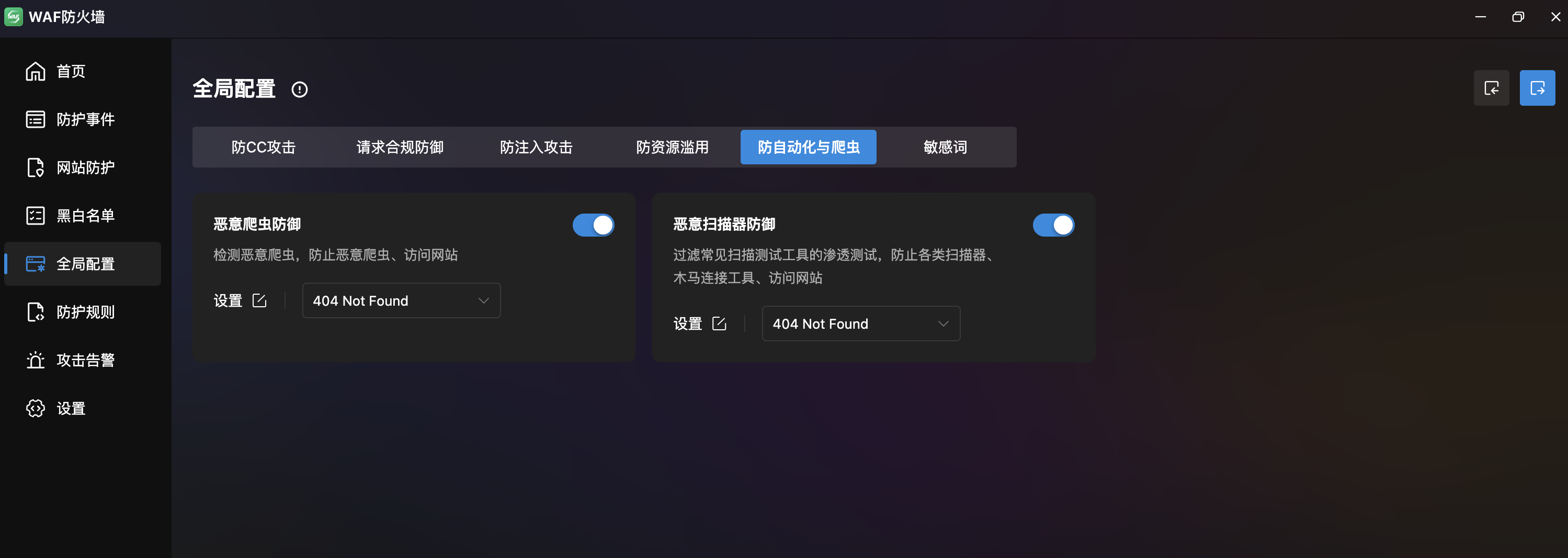
Anti-Automation & Crawlers
| Feature | Description |
|---|---|
| Malicious Crawler Defense | Detects malicious crawlers via UA list (WPScan, HTTrack, antSword, etc.) |
| Malicious Scanner Defense | Blocks scanner/trojan tools by Header, Cookie, and Args extension filters |
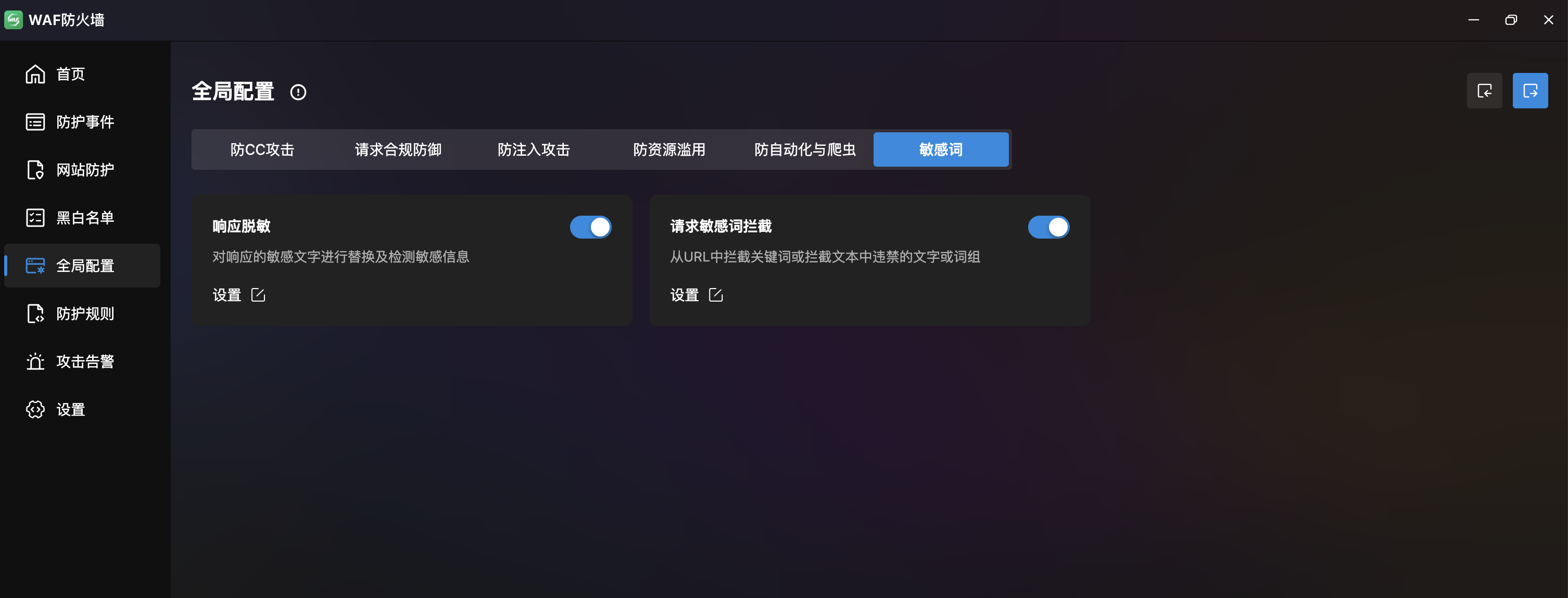
Sensitive Words
| Feature | Description |
|---|---|
| Response Desensitization | Replace/detect sensitive content in responses. Format: sensitive_word>replacement, one per line |
| Request Keyword Block | URL parameter filtering and forbidden words/paths (e.g., /cache/, /config/, /runtime/) |
Protection Rules
Multi-Dimensional Protection Rules. Four tabs: Region Restriction, Rate Limiting, Exclusive Rules, and Custom Rules.
Region Restriction
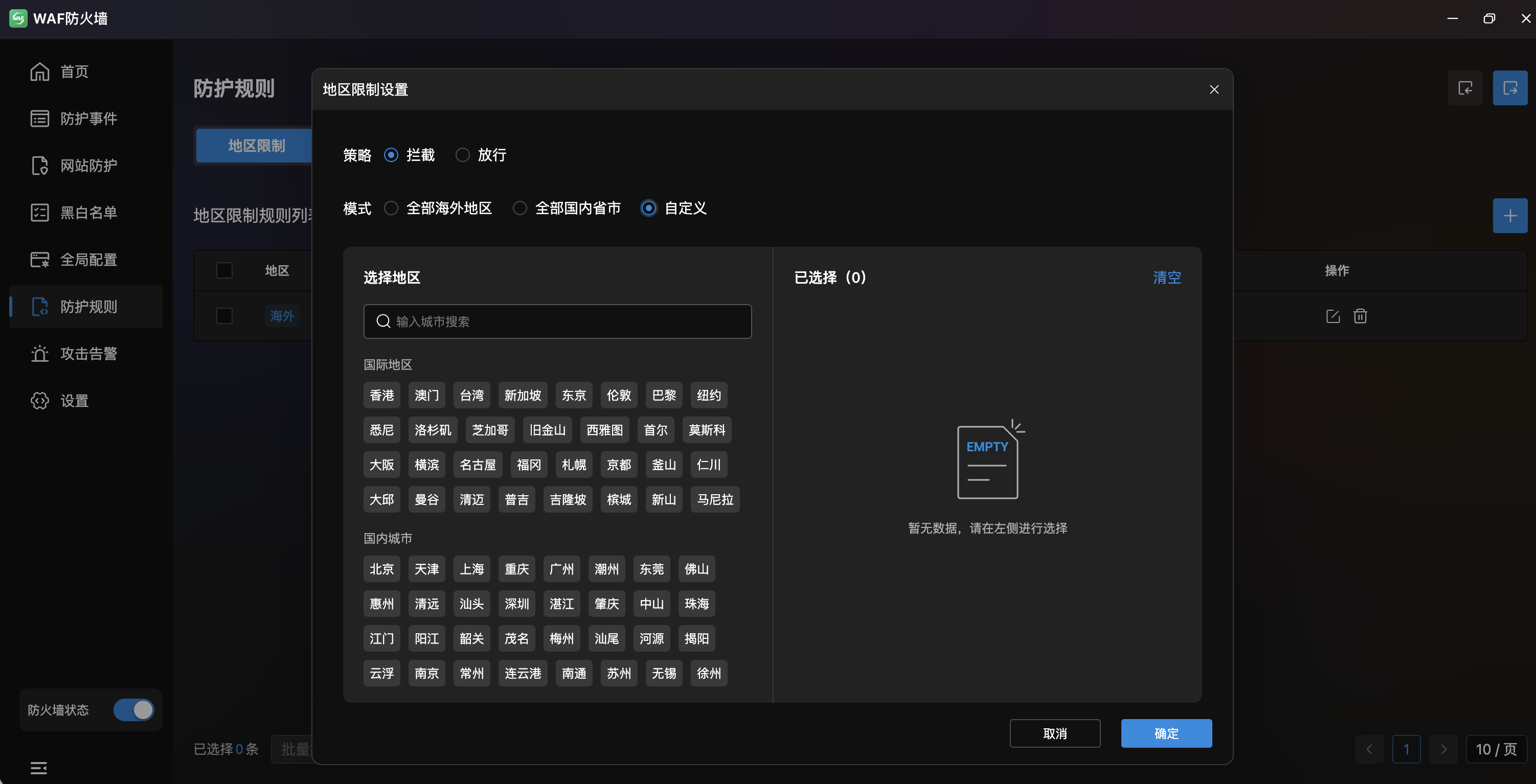
- Rule List: Table with regions (as tags), applied sites, trigger action, status, and actions.
- Region Tags: Colored tags for countries and provinces (e.g.,
US,Japan,Singapore,Guangdong). - Trigger Action: "Block" or "Allow" per rule.
- Applied Sites: Associated sites count with click-to-view and edit.
- Status: Toggle per rule.
- Actions: Import, export, add, edit, delete, drag-reorder.
- Modes:
- All Overseas: One-click block/allow all overseas access.
- All Domestic: One-click block/allow all domestic access.
- Custom: Manual city selection with search.
Rate Limiting
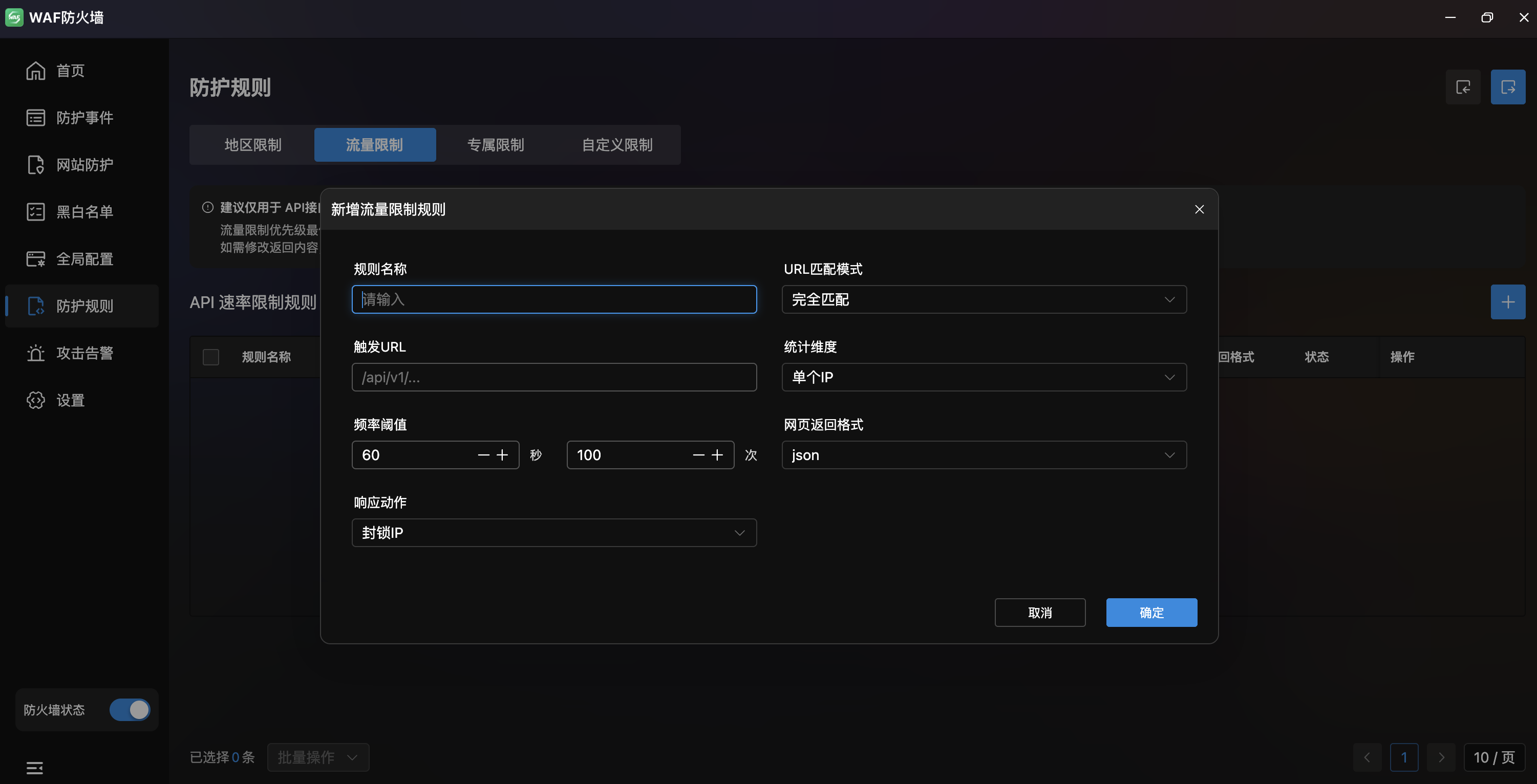
- API Rate Limit Rules: Table with rule name, site config, trigger URL, target, frequency (sec/count), response action, return format, status.
- Recommended for API protection only; site-wide enabling may affect user experience.
| Field | Description |
|---|---|
| Rule Name | Rate limit rule name |
| URL Match Mode | Matching method (exact match, etc.) |
| Trigger URL | API path to rate-limit |
| Scope | Target scope (single IP, etc.) |
| Rate Threshold | Time window and max requests (e.g., 60s / 100 req) |
| Return Format | Response format (JSON, etc.) |
| Response Action | Action on trigger (block IP, etc.) |
Exclusive Rules
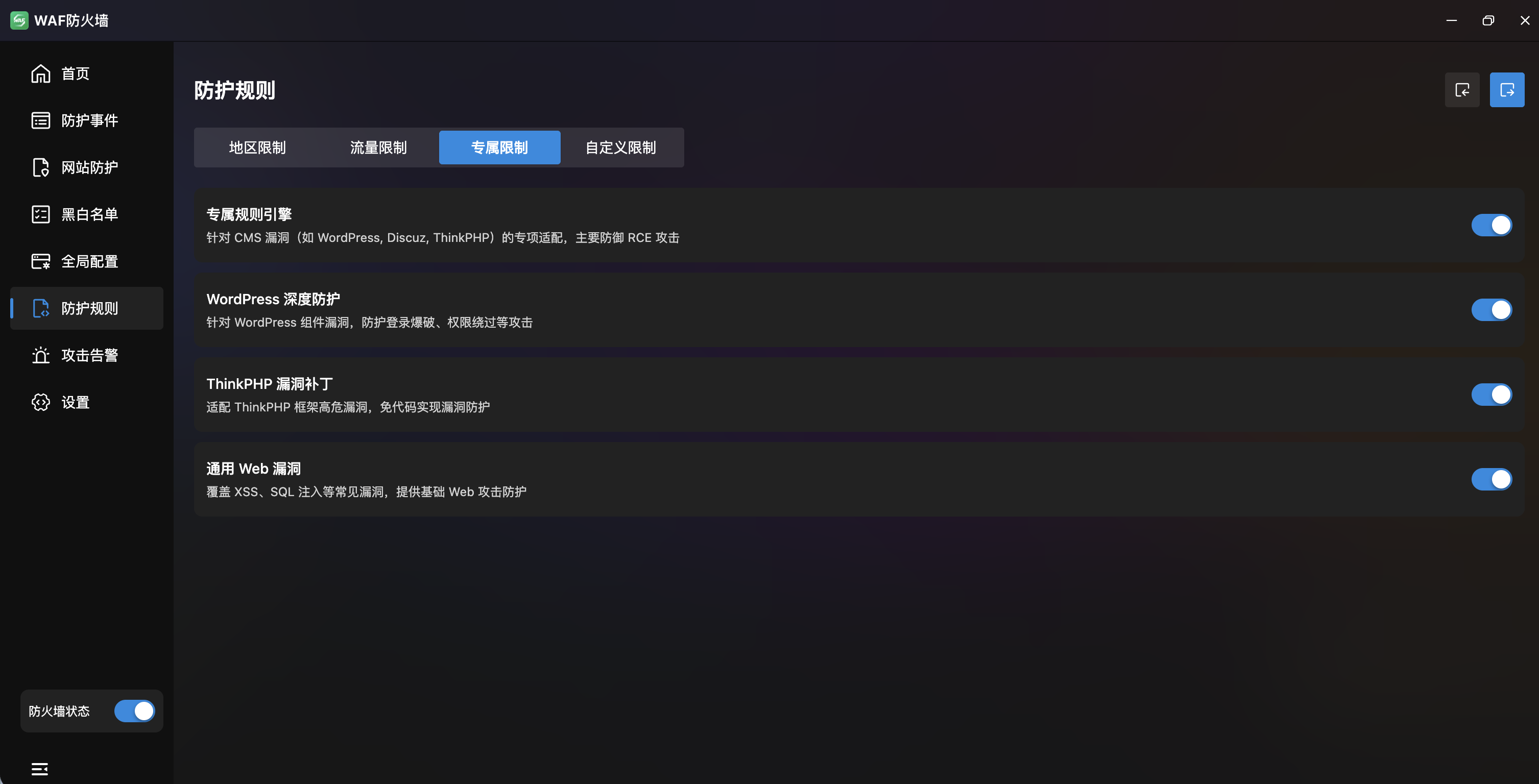
- Exclusive Rule Engine: Master toggle for CMS vulnerability protection (WordPress, Discuz, ThinkPHP), primarily against RCE attacks.
- WordPress Deep Protection: Toggle for WordPress-specific vulnerability defense.
- ThinkPHP Vulnerability Patches: Toggle for ThinkPHP framework protection.
- Common Web Vulnerabilities: Toggle for general web vulnerability rules.
Custom Rules
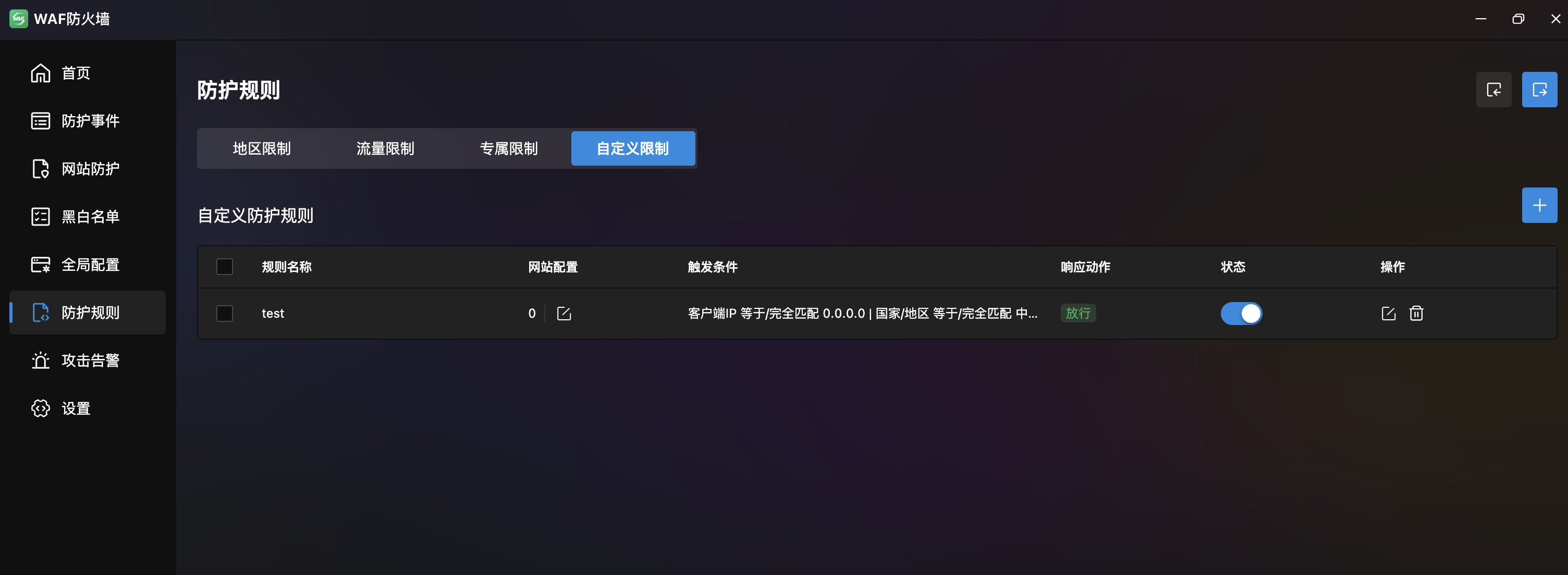
- Custom Rule List: Table with rule name, site config, trigger conditions, response action, status.
- Response Actions: "Block", "Allow", "CAPTCHA".
- Actions: Add, edit, delete, drag-reorder.
Create Custom Rule
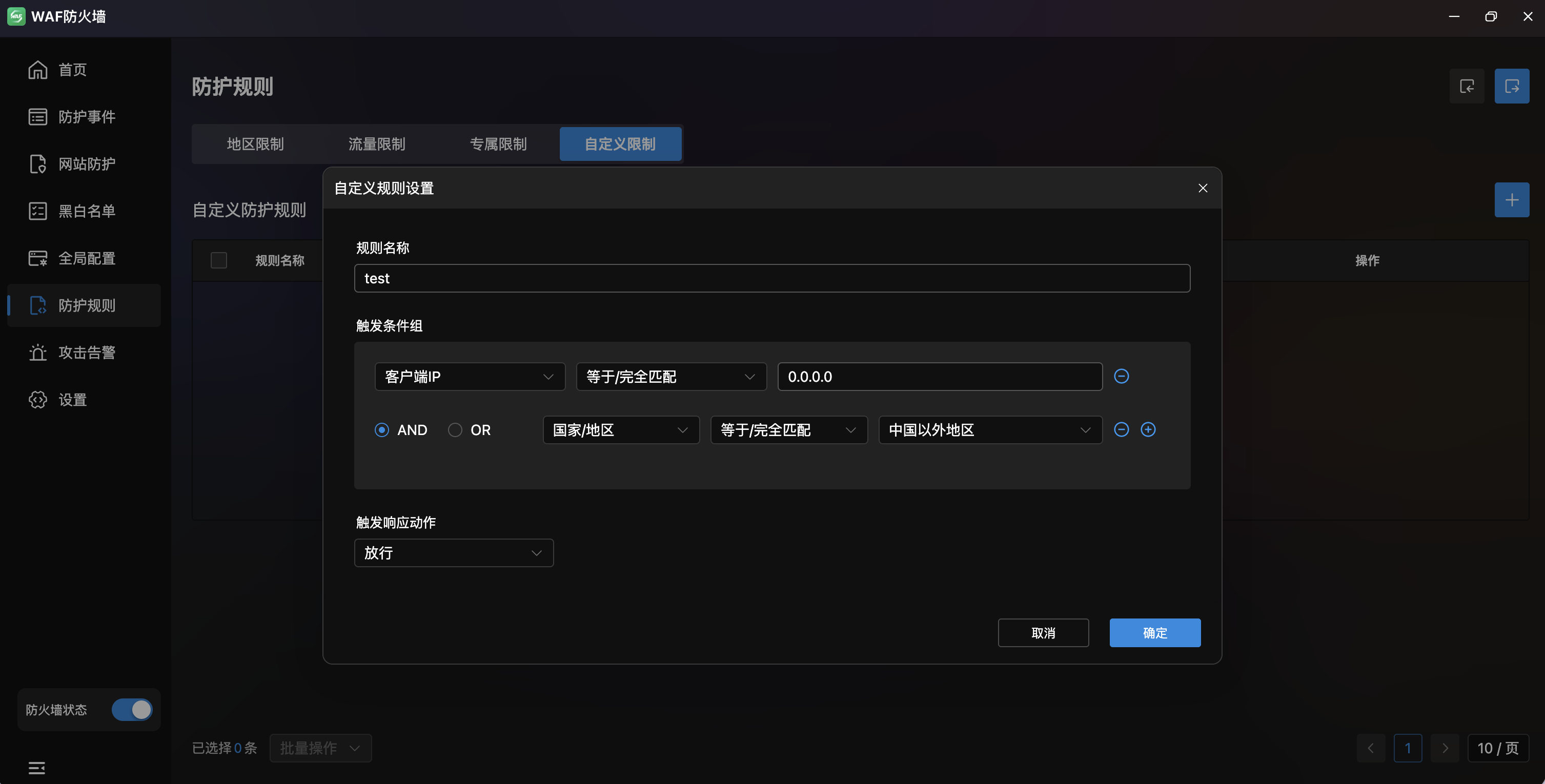
- Rule Name: Input with AI-assisted generation (top-right).
- Trigger Condition Groups: Multi-condition combinations:
- Match Field: Client IP, URL (without params), etc.
- Match Method: Equals / Exact match, etc.
- Match Content: Specific match value.
- Logic: AND / OR between conditions, +/- to add/remove.
- Response Action: Action type (Block/Allow/CAPTCHA) and return status code (e.g., 404).
Attack Alerts
Real-Time Attack Notification Push. Push WAF interception events to DingTalk or custom Webhook for instant response.
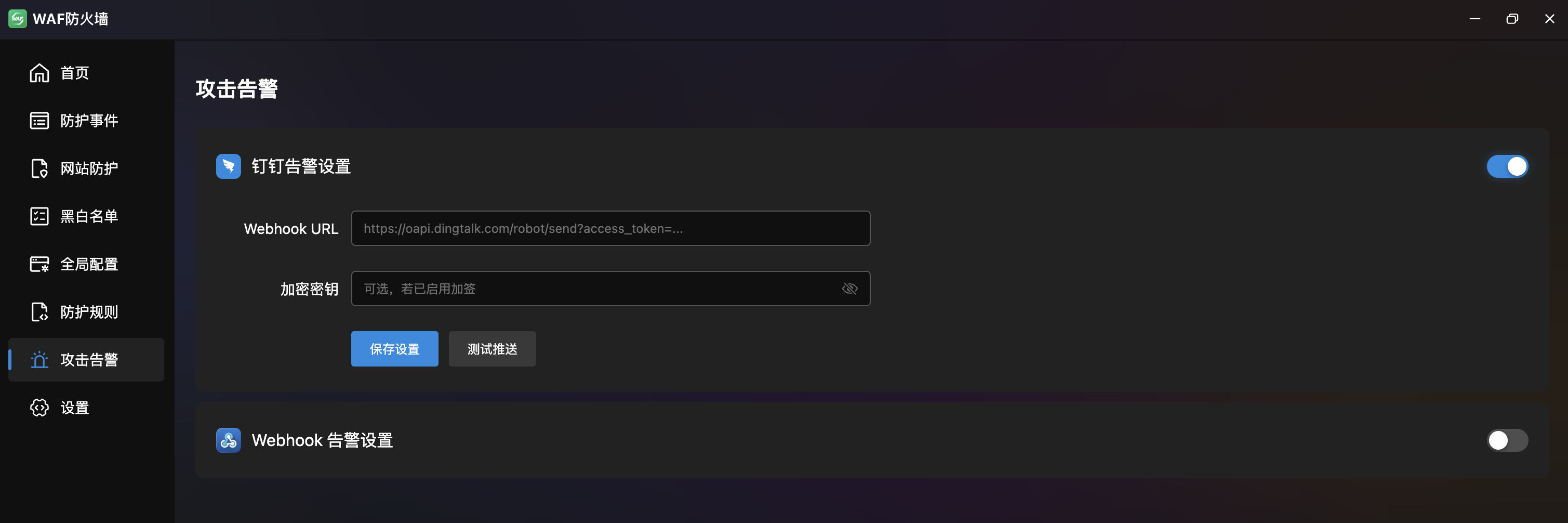
DingTalk Alert Settings
- Toggle: Enable/disable DingTalk push.
- Webhook URL: DingTalk bot Webhook address.
- Encryption Key: Signing verification key (optional).
- Save: Save configuration.
- Test Push: Send test alert to verify setup.
Webhook Alert Settings
- Toggle: Enable/disable Webhook push.
- Webhook URL: Custom Webhook receiver address.
- Test Push: Send test alert.
Settings
WAF Global System Settings. Configure protection mode and CDN real IP retrieval.
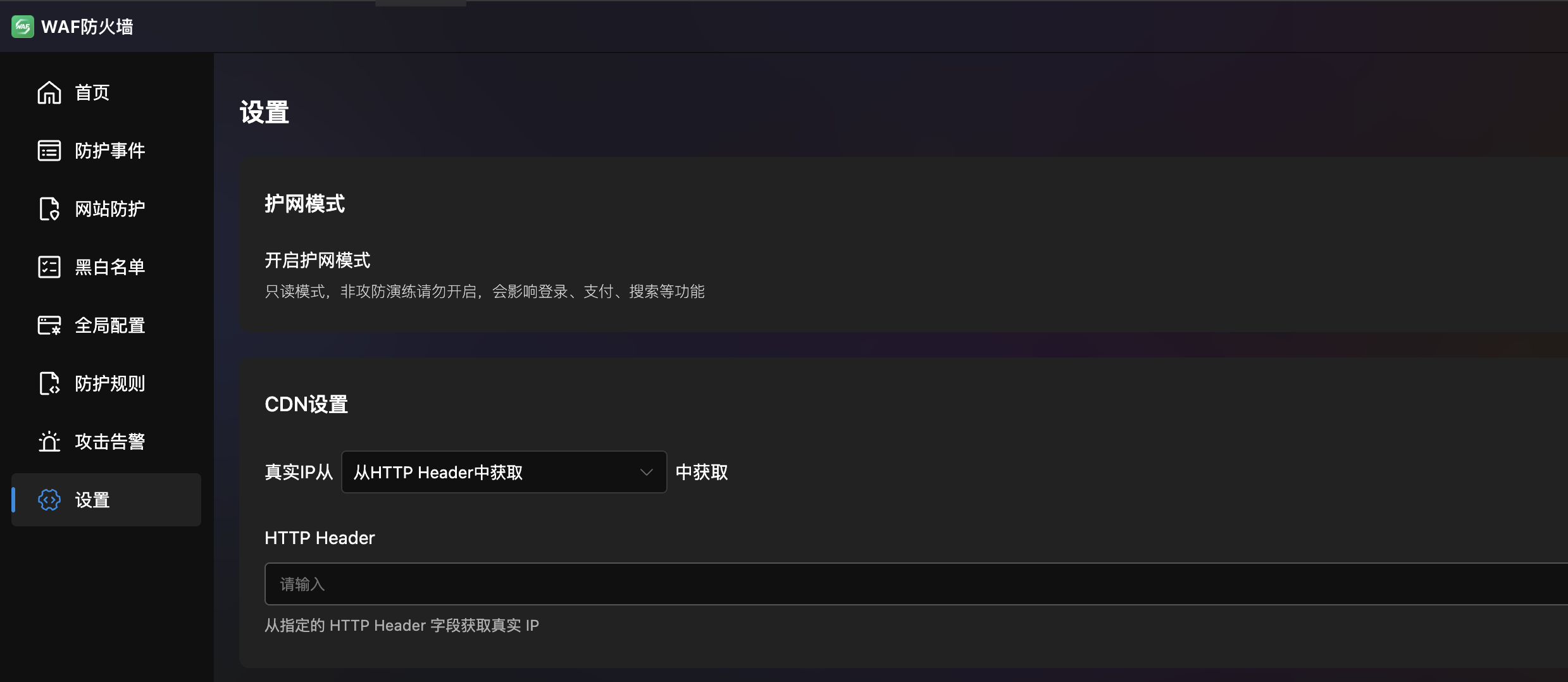
Protection Mode
- Enable Protection Mode: Toggle for read-only mode (all suspicious requests blocked).
- Note: Do not enable unless during security drills — it may affect login, payment, search, and other normal functions.
CDN Settings
Configure how to retrieve the client's real IP when accessing through CDN or reverse proxy:
| Method | Description |
|---|---|
| HTTP Header | Get real IP from a specified header field (e.g., x-real-ip) |
| Header List | Match from multiple headers in order (supports x-forwarded-for, x-real-ip, cf-connecting-ip, etc.) |
| X-Forwarded-For Proxy | Extract real IP from X-Forwarded-For by proxy level (right-to-left, 1 = last proxy) |